1. Who Should Use This Section 1291 Guide
Use this guide if:
- The PFIC has no MTM (§1296) or QEF election, and you are filing under the default §1291 regime.
- You need to compute excess distributions, disposition gain, and §6621 interest across multiple years.
- You are reconstructing historic §1291 years, including years prior to a late QEF or MTM election.
If the PFIC is marketable stock and a timely MTM (§1296) election was made, please use the MTM (§1296) User Guide instead.
2. Prepare the CSV Transaction File (Sec 1291) Download Section 1291 Example (CSV)
Prepare one CSV UTF-8 file per PFIC.
Do not combine multiple PFIC holdings in a single file — this calculator is designed to process only one PFIC at a time.
Required columns (must match exactly):
- Date — YYYY-MM-DD
- Details — text only; must not contain commas, quotes, or line breaks
- Units — numeric only; no thousands separators
-
Value —
numeric only; no thousands separators or currency symbols
(Total amount in the original currency)
| Date | Details | Units | Value |
|---|---|---|---|
| 2020-03-05 | Contribution | 10000 | 15000 |
| 2020-03-17 | Buy | 7.059 | 112.53 |
| 2021-03-31 | Member Fee | -0.8363 | -1.95 |
| 2021-05-15 | Sold | -12.433 | -29.68 |
| 2022-03-12 | Reinvestment | 19.08384 | 22.83 |
Important rules for Section 1291:
- The calculator does not store or remember any data — each run must include full historical PFIC transactions from the first acquisition up to the end of the tax year.
- All Sale / Disposition transactions must use a negative Units value. Any positive Units entry is interpreted as an increase in holdings.
- If the Units or Value fields are blank in your CSV, you must fill them with 0.
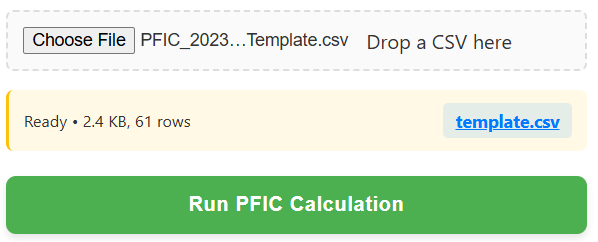
3. Upload File
Click the upload area or drag your CSV file into the box. After uploading, the panel on the right will switch to the Transaction Type Mapping section automatically.
Supported format: CSV (UTF-8 only). If you are starting from Excel, save the file as CSV before uploading.
4. Category Mapping
The calculator will attempt to auto-identify categories based on the Details column, but every row must be reviewed and confirmed.
Available categories:
- Purchase
- Distribution
- Reinvestment
- Sale
- Return of Capital
- Cost Base Adjustment
- Ignore (excluded from PFIC computation)
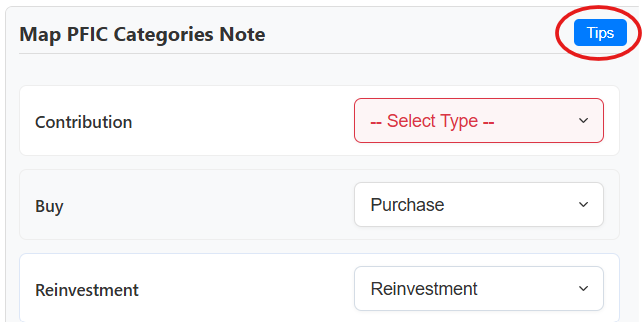
One-page classification summary (decision logic)
Use the rules below to choose the correct Type for each transaction. For Section 1291, accurate classification is essential for FIFO, excess distributions, and historic interest calculations.
| Units Condition | Value / Description Clues | Type (Classification Code) |
|---|---|---|
| Units > 0 | Value > 0 → real cash invested | Purchase |
| Units > 0 | Value = 0 → DRIP / reinvested dividend | Reinvestment |
| Units < 0 | Value < 0 → sale / redemption / switch-out | Sale |
| Units = 0 | Description = Dividend / Distribution / Interest | Distribution |
| Units = 0 | Description shows ROC / Return of Capital | Return of Capital |
| Units = 0 | Description shows basis adjustment (e.g. prior year QEF/MTM adjustments) | Cost Base Adjustment |
| Units = 0 | Fees / charges / NAV adjustments / internal fund tax | Ignore |
Once each row has a clear Type, the calculator can safely build §1291 excess-distribution blocks, multi-year disposition schedules, and audit-ready Form 8621 workpapers.
Special Cases — “Ignore” and Manual Mapping View Ignore Classification Guide →
Entries marked with
-- Select Type --
must be manually mapped.
All other auto-identified categories must be reviewed and confirmed
item by item — only accurate categorization will produce accurate calculations.
Any transaction marked as Ignore is excluded entirely from the calculator. Ignore items must not affect cost basis, distributions, gains, or any Form 8621 amounts.
5. Configure Settings
Settings are displayed on the left panel of the calculator.
Required:
- Tax Year — must be selected.
- Currency — must be selected.
- Ownership % — percent held by the PFIC owner.
- Ending Balance — optional; used for Form 8621 Part I, Line 4.
- PFIC Start — normally the first acquisition year. Adjust only if the PFIC was identified late or the taxpayer became U.S. tax resident after the initial purchase.
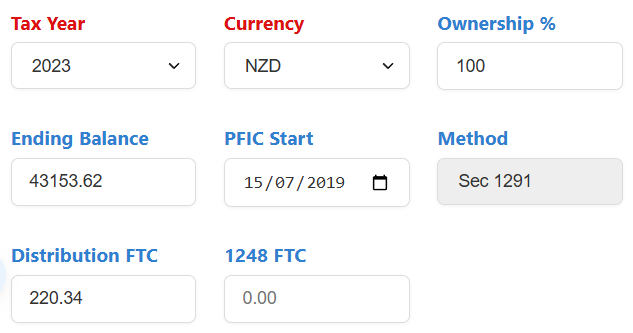
- Method — will be shown as Section 1291.
- Distribution FTC — enter foreign tax withheld on PFIC distributions (if any).
- 1248 FTC — rare; applies only to Section 1291 sales triggering §1248 with foreign tax paid.
6. Run Section 1291 Calculation
Once all transaction categories are mapped, the
green Run PFIC Calculation button will become enabled.
After confirming the tax year, currency, and all other required settings are correct,
click the button to start the Section 1291 computation.
7. License Verification
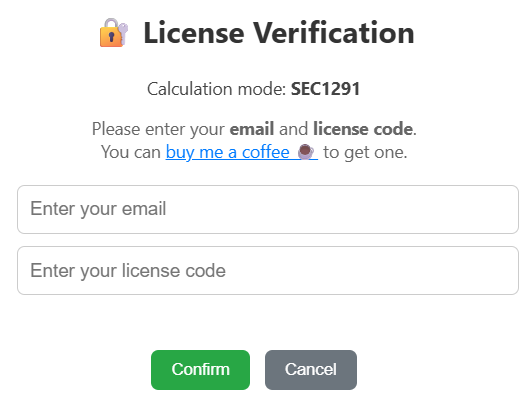
After clicking Run PFIC Calculation, a license verification window will appear. You must enter your email and your license code. The calculation will only start after the license code is validated.
If you don’t have a license code, click buy me a coffee ☕ to support the tool. Send the payment screenshot by email, and you will receive a license code within one business day.
8. Download Excel Results
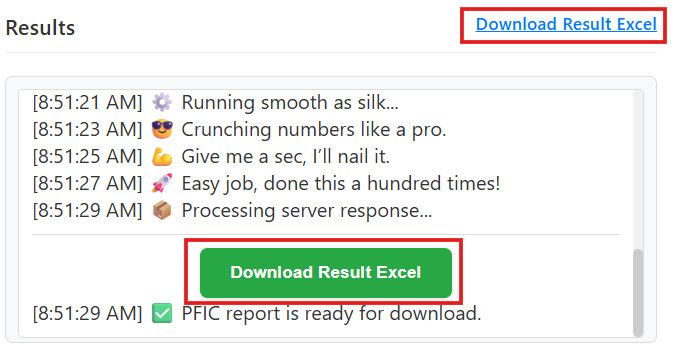
When the calculation is complete, a green Download Result Excel button will appear at the bottom-right of the page. A blue download link will also appear at the top-right — both point to the same file.
The calculator does not store any history. You must download the Excel file immediately after each calculation. If the page is refreshed, the file can no longer be retrieved.
9. Section 1291 Output Sheets & Sample Workpapers
Results are delivered as an Excel workbook with multiple sheets.
A. Section 1291 Outputs Download Sample Section 1291 Result Zip
- CCH_8621_Input — ready for CCH Axcess / ProSystem fx.
- 16a_Summary — key computation data and holdings schedule, with Return of Capital and adjustments if applicable.
- 16a_Disposition — FIFO disposition details, annual tax/interest breakdown, and gain/loss schedule if applicable.
- 16a_Excess_Distribution — if distributions occurred: per-block annual includible distributions with full historical 15b carry history.
- CCH_Upload — additional worksheet uploadable to CCH.
- 8621 Filing Example — Part I and Part V mock-up (for illustration only).
- Other IRS forms (1040, Sch 1, Sch 2, Sch B, Sch D, 8949, 1116), if applicable.
- PFIC_WS — all calculations, including FX conversion and gain/loss categorization mapping.