CCH Axcess™ Form 8621 Quick Guide – Using PFIC Calculator (pfic.xyz) for PFIC §1291 and §1296 MTM
Streamline your international tax workflow with PFIC Calculator (pfic.xyz) workpapers — optimized for CCH Axcess™ users.
1. What PFIC Calculator (pfic.xyz) does for CCH Axcess™ users
This guide is for EAs and CPAs who prepare Form 8621 in CCH Axcess™. It demonstrates a faster, more controlled way to handle PFIC §1291 excess distributions and §1296 MTM.
PFIC Calculator (pfic.xyz) acts as the specialized calculation engine; CCH Axcess remains the system of record for the final return.
Core advantages for CCH Axcess users:
- Designed specifically around CCH Axcess Form 8621 workflows.
- Provides audit-grade workpapers.
- Generates CCH-friendly output files (CCH_1.21_Additional, CCH_6.2_ElectionC, etc.).
- Field order aligns perfectly with CCH input screens.
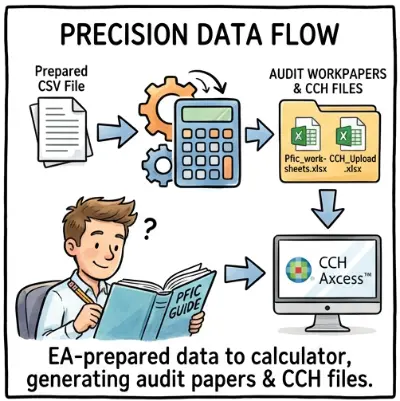
2. Using PFIC Calculator (pfic.xyz) to calculate PFIC under §1291 or §1296 MTM
Before starting, ensure you are familiar with the specific methodology requirements. You can refer to our §1291 guide (Excess Distribution) or §1296 MTM guide.
The calculation path in PFIC Calculator (pfic.xyz) is determined entirely by your CSV preparation.
- If you include FMV rows: The engine runs the §1296 MTM path.
- If you exclude FMV rows: The fund is treated under §1291.
The Output Package
Once processed, PFIC Calculator (pfic.xyz) produces a ZIP file containing the specific files needed for your calculation method:
- Main Workpaper: Full audit trail and calculation support (PDF/Excel).
- CCH_P2_P3 Sheet: (Inside Excel) Formatted for Part 2/3 copy-pasting.
- CCH_1.21_Additional.xlsx: Ready for upload to Part 1.
- CCH_6.2_ElectionC / CCH_6.3_Sale1296: (MTM Only) Ready for upload to Part 6.
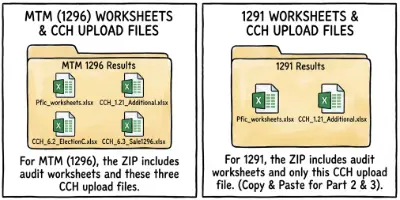
Includes both §1296 MTM and §1291 integration files.
- Match Tax Years: Ensure the Tax Year in PFIC Calculator matches the CCH return year exactly.
- Upload Directly: Do not convert formats or round decimals. Upload the generated Excel files exactly as they are; CCH handles the data automatically.
3. CCH Axcess Form 8621 data entry workflow
3.1 Part 1 — Fund information (CCH_1.21_Additional.xlsx)
- Open CCH Axcess and locate the client return.
- Navigate to Form 8621 > Part I – Fund information.
- Select the option to Import/Upload.
- Choose the CCH_1.21_Additional.xlsx file generated by PFIC Calculator (pfic.xyz).
The titles and field order in CCH_1.21_Additional.xlsx are aligned with the CCH Axcess Part 1 screen. You simply point CCH Axcess to the file and confirm the mapping.
3.2 If the fund is reported under §1291 (Excess Distribution)
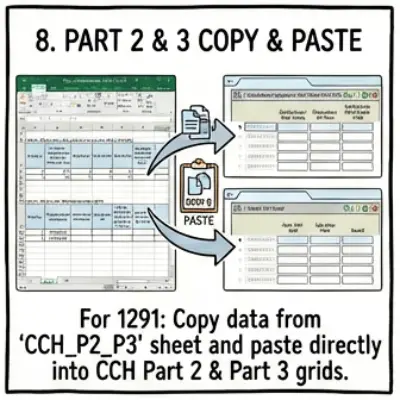
For a §1291 PFIC, use the CCH_P2_P3 sheet inside the main PFIC Calculator (pfic.xyz) workpaper.
Steps:
- Open the CCH_P2_P3 sheet in Excel.
- Copy the distribution rows directly into the CCH Part 2 input grid.
- Copy the disposition rows directly into the CCH Part 3 input grid.
The date formats and amounts are pre-formatted to match CCH requirements.
3.3 If the fund is reported under §1296 MTM (Mark-to-Market)
For §1296 MTM, PFIC Calculator (pfic.xyz) generates dedicated files for direct upload.
Files used:
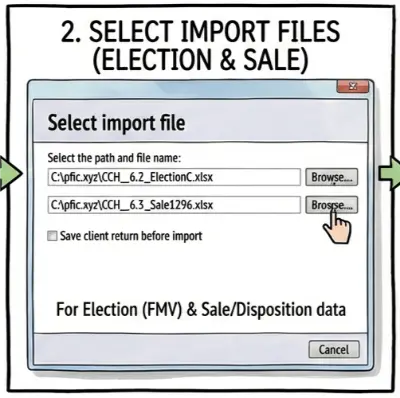
- CCH_6.2_ElectionC.xlsx: FMV / ending value data.
- CCH_6.3_Sale1296.xlsx: Current-year sales (if applicable).
Data entry steps:
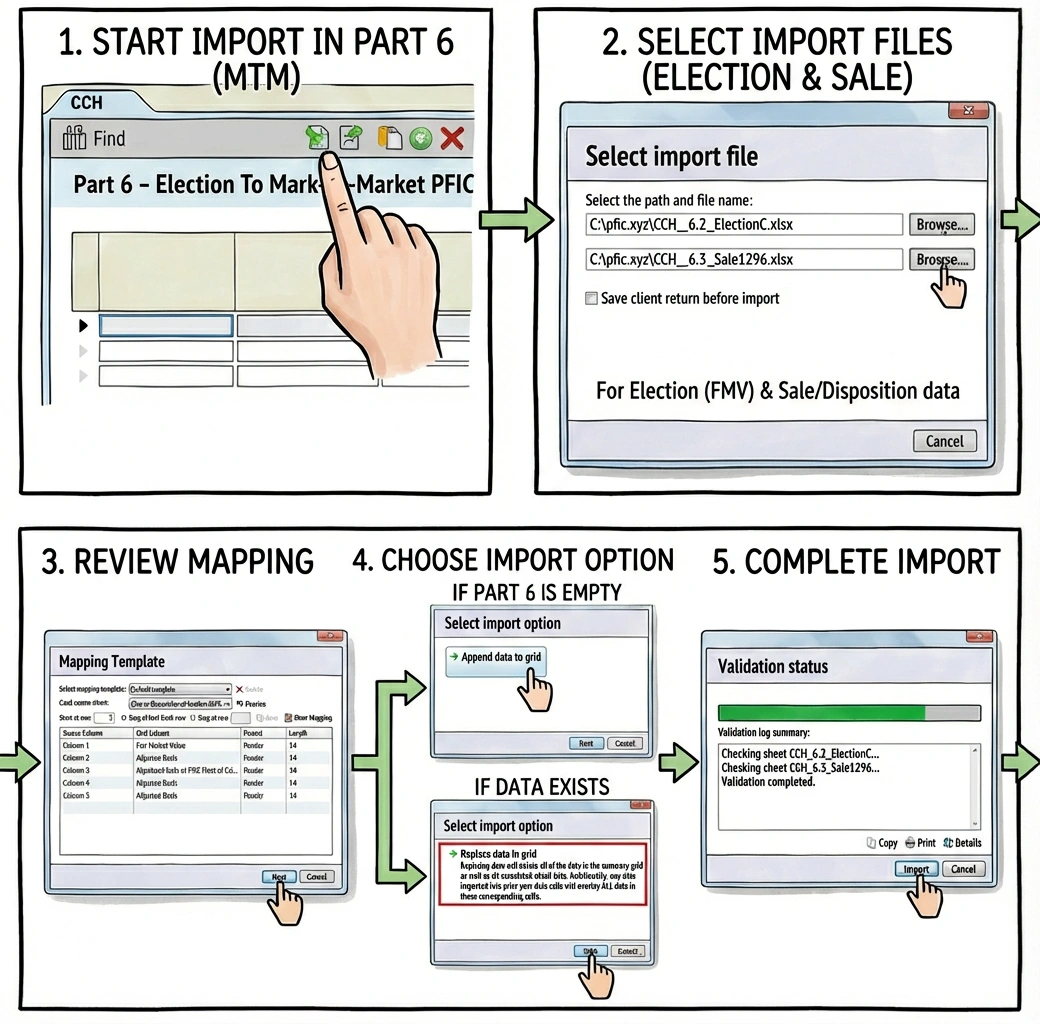
- Go to Part 6 – MTM in CCH Axcess.
- Use the import function to upload CCH_6.2_ElectionC.xlsx.
- If the tax year includes disposals, upload CCH_6.3_Sale1296.xlsx to the Sales section.
4. Summary for CCH Axcess EAs and CPAs
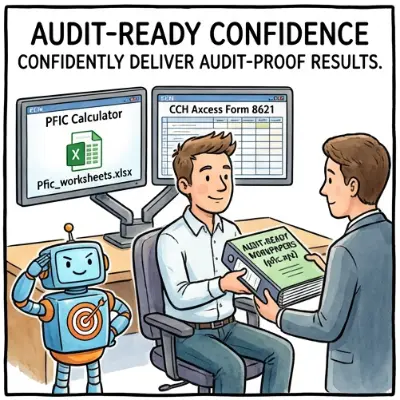
Using PFIC Calculator (pfic.xyz) with CCH Axcess transforms the Form 8621 process from a manual headache into a streamlined workflow, with full audit-ready workpapers included.
| Feature | Benefit |
|---|---|
| Unified Calculation | §1291 and §1296 MTM logic handled automatically. |
| Mapped Files | Inputs for Part 1, 2, 3, & 6 are pre-formatted for CCH. |
| Audit Ready | Get detailed audit-ready workpapers alongside the CCH import files. |
Try with Sample Data
Not ready to use client data? Download our sample CCH integration package to see the file structures.
5. Frequently Asked Questions
Can I attach the PFIC Calculator workpapers to the return?
While CCH Axcess allows attachments, the specific import files (Part 1, 6, etc.) are for data entry only. You should save the full "Audit-Ready Workpaper" Excel file into your firm’s document management system as internal support.
Is the §1291 Interest Calculation Accurate?
Yes. The PFIC Calculator (pfic.xyz) computes §1291 deferred tax and the daily-compounded interest charge as part of the standard calculation workflow. Interest is calculated to the exact day, following IRC §1291(c)(3), §6601, §6621, §6622 and the §7503 start-day rules.
For the technical explanation of how interest is computed, see: PFIC §1291 Interest Calculation for Form 8621.
Does the calculator support transitioning from §1291 to MTM (§1296)?
Yes. The PFIC Calculator (pfic.xyz) supports the full §1291-to-§1296 transition, but it is not an automatic one-step process. You must run the calculation twice:
- Step 1: Run the fund under the §1291 method to purge the §1291 taint (deemed sale).
- Step 2: Run the fund again under the §1296 MTM method to compute the year-end MTM adjustment.
This two-step workflow matches the statutory mechanics. For a full explanation, see: How to Purge PFIC §1291 Taint – Deemed Sale, MTM Transition & Form 8621.
What if my client has multiple PFIC funds?
You will need to run the calculation for each fund separately in PFIC Calculator. In CCH Axcess, you create a new copy of Form 8621 for each fund and import the respective files.